ChemBark’s ongoing series on PowerPoint advice continues with a look at another one of my irrational pet peeves: the “fat” reaction arrow.
If you are writing reactions in a text box, chances are you’ll use the “rightwards arrow”, Unicode character 2192 (hex). You will probably also choose a font without serifs, because slide text (including atomic symbols) looks better without serifs. Unfortunately, this is how the rightwards arrow is rendered in many sans-serifs fonts:
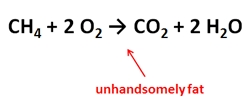
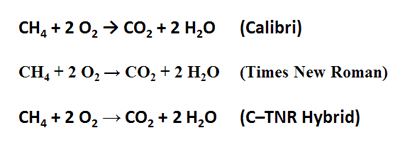
I know this is a matter of personal taste, but there is something about that reaction arrow that turns me off. It’s too fat. The same character in Times New Roman looks much better. She has a graceful elegance relative to her Calibri cousin. Consequently, if you want to stick to Unicode characters for writing out reactions, I advocate writing everything in a sans-serif font, then changing the arrow to Times New Roman. You many also need to adjust its font size to make it look right:
And while we’re on the subject of arrows, there is no need to use the double-headed arrow symbol U+2194 (↔) to indicate an equilibrium. Remember, the double-headed arrow typically separates resonance structures. Instead, use U+21c4 (⇄) or U+21cc (⇌). These characters don’t always appear on the maps in Office, but you can copy and paste the symbols into your text. A full listing of arrow characters is here.